The budget tracker that reads your receipts — and never sees your bank
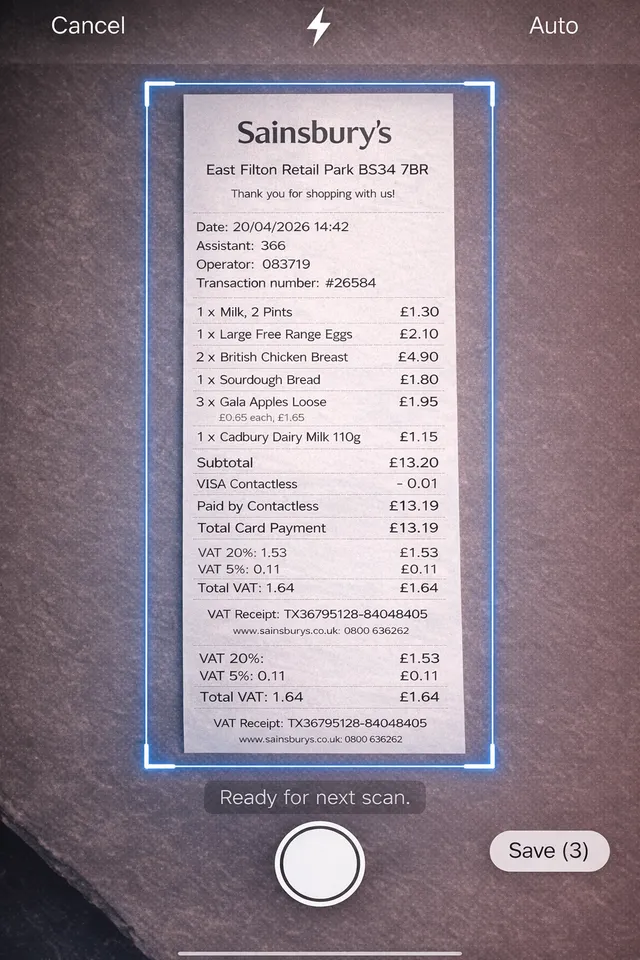
Photograph a receipt and Portofelo logs every line item, categorised. It works fully offline, needs no bank connection and no account, and your spending stays on your phone.
What an offline budget app actually does
Four things, done properly, with no bank login and no sign-up.
Receipt Scanner That Reads Line Items
Most receipt scanner apps store a photo and the total. Portofelo reads the receipt itself — every line item, the vendor, the date — and categorises each line on its own. A €62 supermarket shop stops being one number and becomes groceries, cleaning products and the bottle of wine, split out. That is the difference between knowing what you spent and knowing what you bought. Fifty scans a month on the free plan, unlimited on Pro.
How the receipt scanner works →Compared with five other apps →Budgets That Show Where You Stand
Set a monthly limit per category and the app tracks it as you go. Progress bars show what is left, and a projection shows where the month ends if you carry on at this rate — which is the number that actually changes behaviour, because it arrives while you can still do something about it. Categories are yours to rename or delete. Nothing is locked to a budgeting method you did not choose.
Cash, Cards and Savings in One Place
Track a current account, a credit card, a savings pot and the cash in your wallet side by side, each with its own balance and history. Because there is no bank sync, cash is a first-class account rather than an afterthought — useful if a real part of your spending never touches a card. Multiple currencies are supported, so an account abroad sits alongside the rest.
Offline, With No Bank Connection
Portofelo works fully offline. Your transactions live in a database on the phone, so the app opens and records spending on a plane or in a basement car park. There is no bank connection, so there are no banking credentials to hand over and no PSD2 re-authentication every six months. No account is required to use it, there are no ads, and nothing about your spending is sold on.
How it works
An expense tracker without a bank connection: set it up in under a minute, with no account and no sign-up.
Set your budget
Choose your monthly spending limit. Pick categories that matter to you.
Track every expense
Scan a receipt and every line item is logged and categorised, or type a transaction in by hand.
Stay on track
Get a clear picture of where you stand — progress bars, projections, and insights.
Free tools
Calculators for everyday money decisions, most built on Eurostat and ECB figures. No sign-up, and nothing you type leaves the browser.
Grocery Budget Calculator
A realistic monthly food budget for your country and household size.
Electricity Cost Calculator
What any appliance costs to run per year, at your country's electricity price.
Cost of Living Comparison
The salary you would need to live the same way in another country.
Renovation Cost Estimator
What a bathroom, kitchen or whole flat costs to renovate where you live.
Mortgage Overpayment Calculator
The interest saved and the years cut by paying a bit extra each month.
Overpay or Invest Calculator
Overpay the mortgage or invest in ETFs? Your break-even return and the odds.
All five tools →Simple, transparent pricing
Start free. Upgrade when you need more.
Free
Everything you need to get started
- Unlimited transactions
- Unlimited budgets
- Unlimited accounts
- 50 AI receipt scans / month
- Manual expense entry
- Local data storage
- Dark & light mode
Pro
For power users who want more
- Everything in Free
- Unlimited AI receipt scans
- Cloud backup & sync
- Priority support
- Export to CSV
From the blog
Honest comparisons of the apps people usually weigh Portofelo against, including where they beat it.
The Best Offline Budget Apps — And the Three-Question Test Most of Them Fail
An offline budget app should work with no account, no bank sync and no internet. Here's how to test that in five minutes, and which apps actually pass.
Budget Apps With Receipt Scanning: Compared (2026)
Six budgeting apps that scan receipts, tested on the thing that matters: whether they read the individual line items or just the total. Prices checked August 2026.
Mint Alternatives in Europe: What Actually Works Here
Looking for a Mint alternative in Europe? Which apps work with EU banks via PSD2, which need no bank at all, and what they cost. Checked August 2026.
YNAB Alternatives: Cheaper Apps That Do the Same Job
YNAB costs $109/year. Here are cheaper YNAB alternatives that keep zero-based budgeting, including a free open-source one. Prices checked August 2026.
Monefy Alternatives: Apps Like Monefy, Sorted by Why You're Leaving
Looking for Monefy alternatives? Which apps like Monefy fix sync problems, the subscription, or missing budgets and receipts. Checked August 2026.
Frequently asked questions
Is my financial data safe?
How does receipt scanning work?
Can I use Portofelo offline?
Do I need to connect my bank account?
What currencies are supported?
Can I switch from Free to Pro later?
Ready to take control?
Free on the App Store. No account, no bank connection, no ads — and it works with the phone in flight mode.